
Print Bleeds: The Thrills and Chills of Print Design
Table of Contents
They lurk at the corners of your print design, reaching for the cut lines and keeping you on the edge of your seat, er… print project, that is. They’re print bleeds!
They might sound scary, but they’re a crucial part of the large-scale print design, direct mail, and marketing process. Print bleeds can make your print design look sleek and professional, without weird shapes creeping into the edges of your print pieces or important information getting hacked off.
However, ignoring print bleeds can lead to a marketing jump scare and lots of ruined prints. We’re here to give you the ultimate guide to print bleeds and how ignoring them might be killing your print design.
Take a Peek at Print Bleeds
Print bleeds are the areas that your design stretches beyond where the final piece will be cut. This means you’ll have an extra bit of design at the edges to keep the guillotine cutter (We’re not just being scary with this one. That’s really what it’s called, alongside other specialty equipment) away from the important parts of your design.
Print bleeds are extremely useful for print marketing. Even if you’re leaving a bit of a border around your print piece, you’ll want to leave some bleed space to make sure you don’t lose anything important like your business name, contact details, or address while you design.
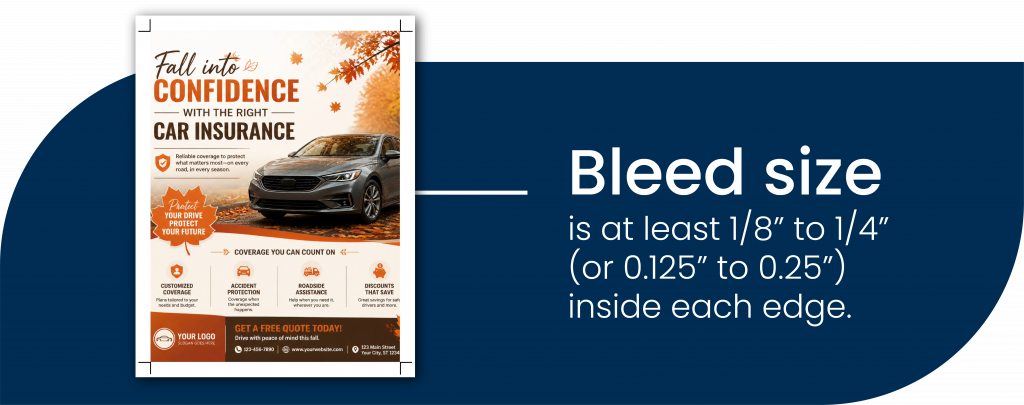
Bleed size is at least 1/8” to 1/4″ (or 0.125” to 0.25”) inside each edge.
Print bleeds all come down to wiggle room. Design your marketing piece with a little extra space between the edge and your important information, and it will be all treats, no tricks.
Edgy Print Design Content
Printing on the edge might make you nervous, but once you understand what gets axed and what doesn’t, you can design with confidence.
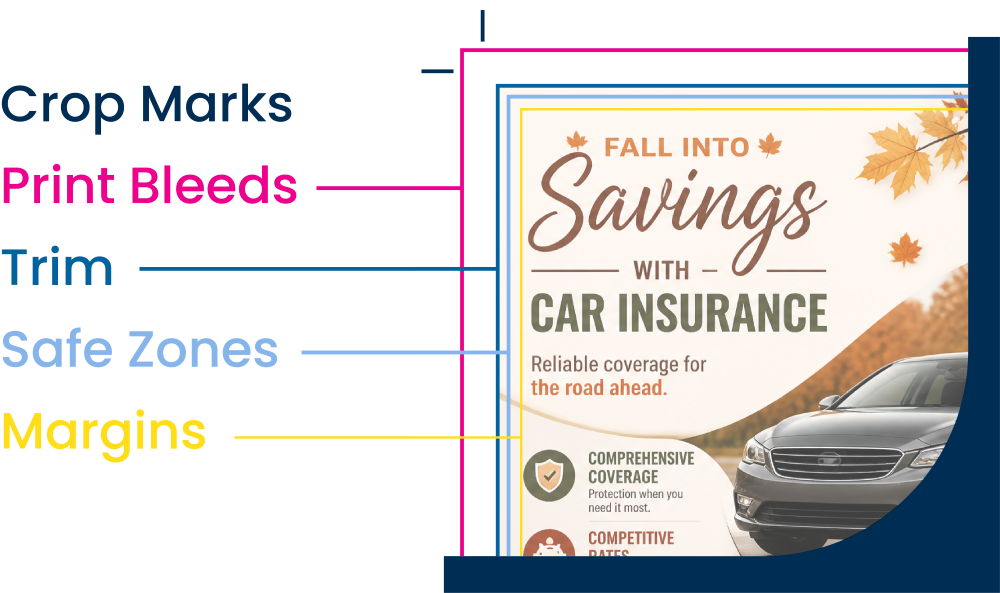
Print Bleeds – An extra part of a design that reaches to the edge of your print piece that will likely not make the final cut of the finished product.
Margins – A border around your print design that acts as a cushion between your content and the edge of the print piece and is part of the design itself.
Safe Zones – Areas that are guaranteed to appear on your print piece. These are where you put important info like your business name and contact details.
Trim – The amount of paper being clipped from your finished product. These areas will definitely land on the cutting room floor.
Your success with print bleeds starts with your design, so live on the edge a little and make sure the content that gets cut isn’t something you need.
Do Not Enter!
Other Areas to Avoid with Print Design
Print bleeds and print margins are essential for direct mail design, but they aren’t the only printing areas to consider when you plan your next direct mail campaign. Sending mail involves many moving parts, and your marketing print design needs to account for them.
You don’t want to put any barriers between your recipients and important information on your marketing, so run and hide from these areas in your direct mail print design:
Postage – Depending on your mail piece, the USPS® will need to display how your mail was paid for. Whether it’s a sticker or stamped information, don’t get lost under the postage!
Address – Your recipient is the most important part of your direct mail marketing, so their name and destination will print over anything you put in this area.
Bar Codes – Mail depends on bar codes. They’re essential for tracking and delivery, and need to be printed clearly with black on white to scan properly, so anything under them will disappear!
QR Codes – An incredibly useful marketing analytics and tracking tool, these also work best with high-contrast black on white. Any part of your design behind a QR code will be a ghost.
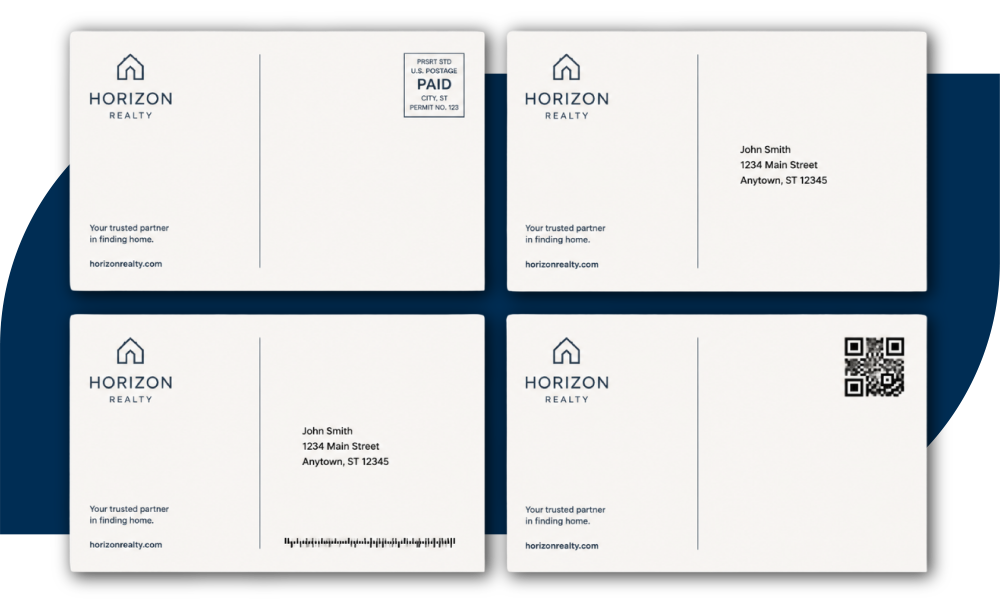
Luckily, these mailing zones are usually all in one place on the back side, clearly labeled on mailing templates where you upload your own design, and easy to avoid before you print your piece. Just look for “live areas” or “safe zones” to input your print design.
Saved by the Proof
It never hurts to double-check, especially your print design, safe zones, and print bleeds. That’s where the proof comes in! Your proof shows where your print design will appear, how your information will be laid out, and where you might run into trouble with your print bleeds. It’s critical that you don’t skip this step.
While their name sounds like something out of a thriller, print bleeds are actually one of the best guardians of print design, saving you from falling off the edge with your marketing print pieces.
If you still have questions, the print experts at Xpressdocs are here to bring your marketing print designs to life with high-quality print, expert direct mail solutions, and smart technology for businesses of all sizes. Contact us today!
Key Takeaways
- What are print bleeds?: Print bleeds are the areas that stretches past where your print piece is going to be trimmed, so your design can seamlessly sit at the edge of your piece.
- Why are bleeds important for direct mail and print design?: Print bleeds offer a sleek, professional edge-to-edge look when you don’t need to worry about margins.
- How much bleed do I need for a printed document?: At least 1/8” to 1/4” or 0.125” to 0.25” inside the edge of your print project.
- What’s the difference between print bleeds, margins, and safe zones?: Print bleed is the extra edge where your print piece is going to be cut, a margin is a border around your print project that is part of the design itself, and a safe zone is where you can safely put your print design to appear on your print piece.
- Can I print without bleed?: If your design bumps against the edge, you run the risk of important information getting cut off from your print design.
- How do I set up bleeds in my prints?: The easiest way is to use templates with bleed already built in, like the ones offered by Xpressdocs, which show bleed lines, safe zones, and mailing areas so you can adjust your design accordingly.